How To Manage Campaigns With Amazon Advertising Portfolios



A new feature called Amazon Advertising Portfolios is now available in select accounts within Amazon Advertising. This feature offers a smart way to categorize your campaigns based on shared characteristics. You can think about Amazon Advertising Portfolios as a logical grouping mechanism that organizes ad campaigns with respect to brands, products, and budget.
How To Make An Amazon Advertising Portfolio
First, sign in to your Amazon Advertising dashboard. Second, navigate to the "Campaigns" tab and click on it. Under "All Campaigns", you should see a menu option labeled "Portfolios". Within that section is a button labeled "Create a portfolio"; click on that. From there, simply follow the onscreen prompts to create your first ad portfolio.
Tips On Portfolio Organization
You can build a portfolio by combining Sponsored Ads and Sponsored Brands into a single portfolio. For example, let’s say you would like to spend $20,000 for the Thanksgiving event. You can create a portfolio of Sponsored Ads and Sponsored Brands campaigns, set the target budget as $20,000, and set the portfolio duration for the entire week of Thanksgiving.
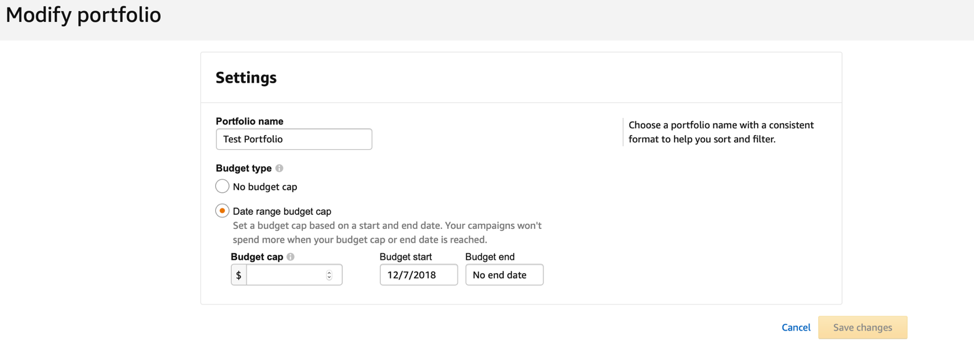
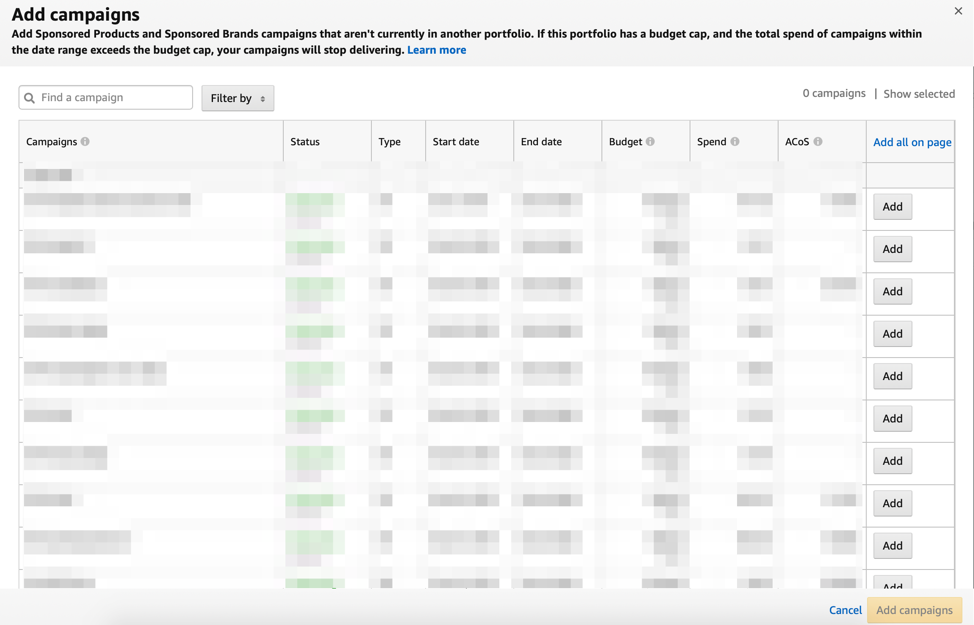
When budgets are spent, campaigns are automatically paused. You can also review your portfolios' performance, which further helps in optimizing them.
Portfolios For Sponsored Brand Campaigns
Another use case is setting up a portfolio for your brand campaigns. This feature provides an improved view of billing which shows spend by portfolio. Also, an additional report under the Advertising reports section is available for portfolios.
We'll share more insights about the results of our tests with Amazon Advertising Portfolios in the future.
Read our post "Sponsored Display Ads for Brand Awareness" for tips on leveraging Sponsored display ads to improve visibility and sales.