Maximize Customer Engagement and Sales with Amazon Stores



Amazon Stores is a free, DIY service from Amazon that allows its sellers and vendors to create attractive multi-page online stores for their brands on amazon.com. Launched in 2017, Amazon Stores makes it easy for advertisers to curate content that inspires, educates, and helps shoppers discover the brand’s product selection.
WHY AMAZON STORES?
Amazon Stores gives advertisers control to create an engaging shopping experience on Amazon that they can optimize using high-quality data and insights. Stores are easy to build and update (no coding required!) and are responsive on mobile and desktop without any additional work.
With Amazon Stores you can:
- Create a shopping destination on Amazon with a short URL with your brand (amazon.com/BRAND)
- Make sure your Amazon store matches your brand’s look and feel
- Reach Amazon shoppers at various stages of their shopping journey
- Help your brand stand apart from others through rich media like images, text, and videos
- Build brand engagement by offering a breadth of fresh and relevant content
- Increase basket sizes by displaying all of your complementary products in one place
- Drive traffic to the store through organic and paid channels
- Optimize performance using insights about campaigns, traffic, and sales related to your Store
- Promote your brand easily through built-in features like social sharing buttons
Value Proposition for Advertisers
- Brand advertising on Amazon: Create awareness
- Increased brand recognition
- Increased brand-related searches
- Increased repeat visitors and shopper conversions
- 100% self-service and free
- Place products across different verticals and sub-brands in dedicated sub-pages
- Differentiate categories under a large brand
- Promote new/focus products
- Customizable builder displaying full website and multi-page layout
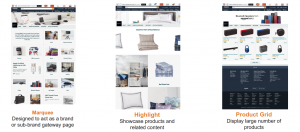
- Easy to use templates such as Marquee, Showcase/ Highlight and Product Grid
- Opportunity to improve the shopper experience with more dynamic content and customization options
- Discoverable within Amazon and through external marketing and social media channels
- Organic ingress via by-line
- Robust reporting and insights
Value Proposition for Shoppers
- Easily discover new products and lines from brands they love
- Easy navigation
- Better user experience with rich media content
- Broader product selection
AMAZON STORE CREATION
You can create a store on Amazon in six easy steps.
1.Enroll your brand in Amazon's Brand Registry

Amazon Brand Registry helps you protect your registered trademarks on Amazon and create an accurate and trusted experience for customers.
As per Amazon's website, to enroll your brand, you’ll need:
- An active trademark for your brand that appears on your products or packaging
- The ability to verify yourself as the rights owner or the authorized agent for the trademark
- An Amazon account. You can use an existing Amazon account (credentials associated with Vendor or Seller Central) or create a new one for free
2. Create your store's homepage using one of Amazon's three templates
Once the brand is registered, you can navigate to the Manage Stores section within Ad Console or Seller Central to set up your first Amazon Store.

You will then have a list of your brands that are eligible for store creation.
Once the brands are selected, you will then be prompted to follow additional steps, which includes selecting your homepage template.
Amazon Stores offers three templates to allow you to quickly set up a page with default tiles:
3. Build Amazon Store Pages
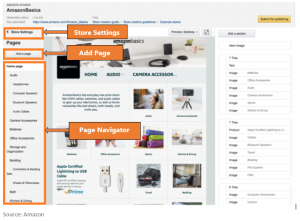
Once your store homepage is ready, it’s time to build out additional pages based on your catalog categories, best-selling products, deals etc.,
You’ll want to build out your pages much in the same way as you would your own ecommerce website; make sure that navigation is simple enough for customers to easily find what they’re looking for.
4. Add content tiles to each page
Once you’ve set the hierarchy of pages for your customers to navigate through, now it’s time to add the content tiles to each page.
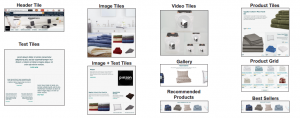
Content tiles carry the content that customers interact with on each page of your store. There are several types of tiles available:
- Titles
- Images
- Product grids (e.g., best sellers)
- Video Tiles
- Gallery
- Navigation
5. Upload ASINs
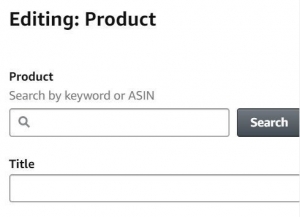
Once the pages are built and the content tiles are added, you can then add individual products by category to product grid tiles or other tiles or pages of your store. Amazon makes this easy because you can search for the ASINs that you are already selling on the marketplace.
6. Review and publish
Once you have finished building your Amazon Store you can submit it for review.
Before you publish your Amazon Store, be sure to check for the following:
- Grammar, language and spelling
- Image or branding inconsistencies
- Responsiveness on mobile (you can use the mobile preview to do this)
- Clarity of images and videos
OUR FAVORITE STORES FEATURES
Amazon is constantly innovating to make sure businesses have all the tools they need to tell a great story. Here are a few we love.
1. Background Videos
Every marketer worth his salt knows the power of videos to tell a story. Background video -- a new tile option in Stores -- offers the option of autoplaying videos on a loop silently on the brand's page. These 2-20 second videos can be played on full-width, large or medium tiles. Brands can use the background video tile to enrich the content on their store to tell their brand story or highlight products.
2. Stores Insights dashboard
Amazon Stores offers relevant performance metrics to help advertisers optimize their store.
Amazon launched a set of new performance metrics that allow store owners to measure efficiency of visitor traffic and basket building behavior. In addition to reporting sales, units, and views, the service now also reports:
- Sales/Visitor
- Sales/Visit
- Orders
- Orders/Visit
- Units/Order (A measure of order size)
- Sales/Order (A measure of order value)
This helps store owners make more informed optimization decisions depending on their goals.
3. Add to cart button available within product grid
Add to cart is now available on product grid widgets on Stores. Amazon provide shoppers with the ability to add products to their shopping carts directly from a store. Store owners can showcase specific ASINs prominently through individual product tiles or use the product grids for a larger number of ASINs. Product grids include Add to cart and star ratings.
For more information visit the Amazon Stores page or download their user guide and start building your own branded store for free on the world's leading e-commerce site.
Read our post "Protect your Brand through Amazon Brand Registry" to understand how to safeguard your intellectual property and fight fakes on Amazon.